Check Lyric Captions After Export and Reimport

Export a copy, reopen that exact file, and compare its text, cue boundaries, and speaker labels with your approved caption record. Then review it in the destination player. A saved file alone does not show that the captions still convey the intended song. Keep the source project so a failed conversion can be corrected without rebuilding the timing work.
This guide addresses the handoff after caption editing. It does not retime a performance, rewrite lyrics, or recommend a winning generator. If you are choosing the best AI music generator for a production workflow, caption delivery is one downstream task to plan separately from music generation.
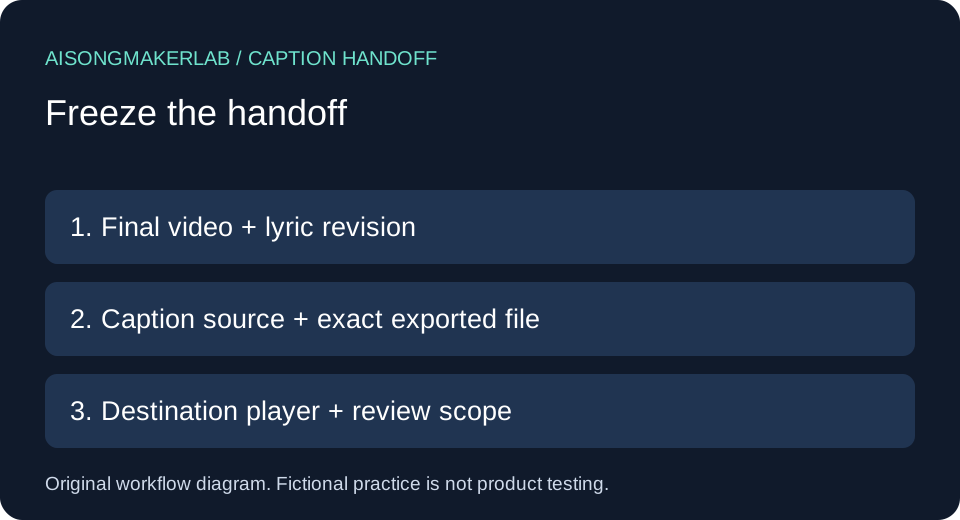
Start with a small handoff record
Give the final video, approved lyric revision, caption source, exported caption file, and destination player distinct identifiers. Keep the original export unchanged while reviewing a working copy. Write down which file you actually opened; two files with similar names can contain different revisions.
W3C WAI caption guidance describes WebVTT and other caption formats, including SRT and TTML. It also notes that support for caption positioning and styling varies across browsers and players. Therefore, choose a format accepted by your destination and inspect the result there. A filename extension is not evidence that every feature survived a conversion. Source read November 7, 2026.
A practical comparison sequence
- Freeze the lyric revision and caption source that belong to the final video export.
- Export a separate caption file, retaining the editable source and its original settings.
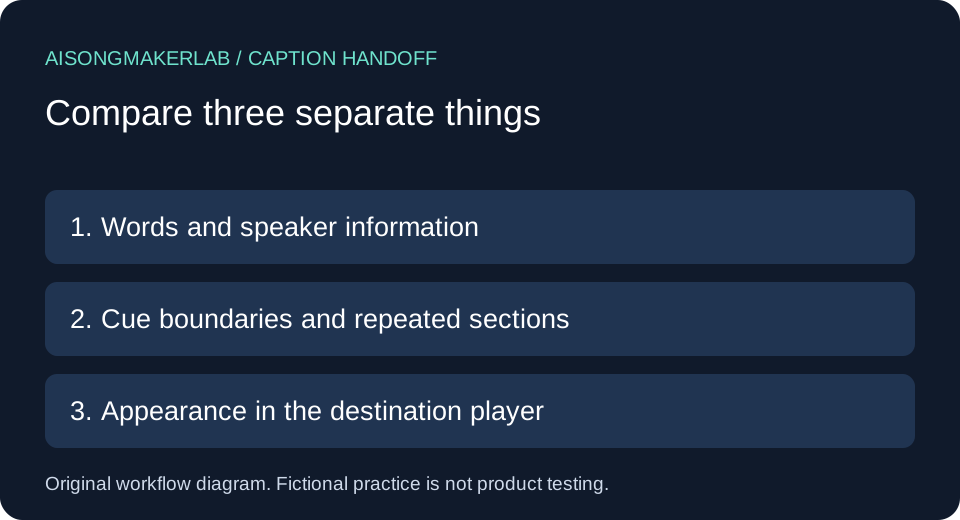
- Reopen the exported file and compare words, cue boundaries, labels, and repeated sections with the approved record.
- Load that exact file in the destination player and inspect representative passages, including the opening and ending.
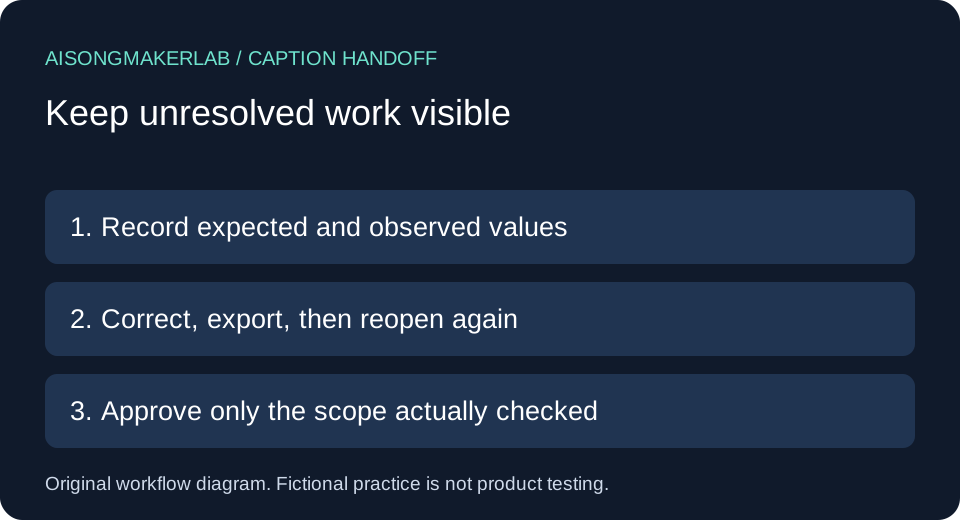
- Record differences and unresolved checks. After any correction, export a new revision and repeat the affected checks.
Our proposed review record separates text equality, time equality, and displayed appearance. Each can pass while another fails. Do not hide an unknown player result behind a successful file comparison. For timing against actual singing, use the separate caption timing workflow.
Five self-authored fictional cases
The following five cases are self-authored fictional editing scenarios. The lyrics, people, revisions, and outcomes are invented to explain review decisions. They are not generated vendor results, tests of conversion software, recordings, or observed customer experiences. The downloadable JSON preserves these same authored inputs and proposed decisions.
1. A repeated refrain disappears
Fictional setup: The approved record contains “Leave a light beside the door” in both the first and final refrains. An imagined exported file contains that line only once. The editor has checked the first occurrence and is about to approve the file because the words look familiar.
Review decision: Identify occurrences by their position in the song, not by unique text. Compare the final refrain separately and mark its missing cue as unresolved. Keep both occurrences in the source record even though their words match. Counting unique lines would conceal this mistake; a cue inventory with section names makes the missing event visible.
Proposed correction and evidence: Restore the final occurrence from the approved source, then review its own start and end against the final video. Save the revised export identifier and the inspected final-refrain cue. Do not copy the first refrain's timestamps merely because its text matches. This fictional exercise demonstrates a completeness check, not a claim that any exporter removes duplicates.
2. A singer label becomes visible markup
Fictional setup: Two imaginary singers, Mira and Leon, alternate lines. The approved source associates “I will wait beside the gate” with Mira. In an imagined destination preview, an internal label appears as raw punctuation and tag text around her name instead of the intended readable speaker identification.
Review decision: Separate the intended information from the mechanism used to encode it. The important handoff requirement is that viewers can identify the singer when that distinction matters. A label existing somewhere in the file does not establish that the player presents it usefully. Write down the observed display before changing the source.
Proposed correction and evidence: Use a speaker-identification approach supported by the actual delivery format and player, then inspect the same exchange again. Preserve Mira's sung words while editing the label. Mark the case pending until a destination preview is available. The scenario does not assert that a particular format or player mishandles speaker tags; it supplies a question to check.
3. A cue boundary changes while the text stays intact
Fictional setup: The approved cue record assigns “Bring the morning home” to an invented interval from 12.400 to 15.200 seconds. The imagined reopened file shows 12.000 to 15.000 seconds. Every word matches, so a text-only comparison reports no difference.
Review decision: Compare the numeric cue fields independently from the lyric text. Record both pairs of timestamps. In this fictional record, the start moved 0.400 seconds earlier and the end moved 0.200 seconds earlier. These differences follow from the authored numbers; they are not measurements of a song or estimates of a universal acceptable tolerance.
Proposed correction and evidence: Return to the intended timing record, investigate the export settings, and audition the corrected cue against the actual final vocal when available. Do not automatically shift all later cues by the same amount: this one example does not establish a global offset. Keep the numerical mismatch and listening status as separate fields so the file check cannot be mistaken for an audio review.
4. A name changes during text handling
Fictional setup: An imaginary song addresses a character named “Zoë.” The approved cue says “Zoë, meet me after sunrise.” In an imagined working copy, the name is displayed as “Zo?” while the remaining line is unchanged. The file opens successfully and still contains the expected number of cues.
Review decision: Check meaningful characters, not only word counts and file readability. Compare the name directly with the approved lyric source. Record the exact affected cue and the characters displayed. Do not infer that the songwriter approved a spelling change or normalize the name just to make a comparison pass.
Proposed correction and evidence: Inspect the text encoding and the import/export path, correct the working copy from the approved source, and reopen the new export. Then check the name in the destination player too. If the stored text is correct but the display is wrong, retain that distinction for the next investigation. This scenario does not diagnose a real encoding failure or promise that changing an encoding setting will resolve every display problem.
5. The correct file is attached to the wrong video revision
Fictional setup: A caption file was reviewed for “Harbor revision A.” A later imaginary video edit adds an opening title sequence, but the delivery folder still contains the caption file named “final.” The caption words and timestamps match their old approved record exactly.
Review decision: Check the relationship between files before accepting either file in isolation. The old comparison can remain valid for revision A while providing no approval for revision B. Mark the new video-to-caption pairing unreviewed and identify the new opening sequence as a reason to inspect the timing again.
Proposed correction and evidence: Pair the captions with the intended final video, replay the opening, middle, and ending, and review all timing affected by the edit. Save the video identifier with the new caption revision. Do not rename the old file and treat that as a new review. The example explains why a handoff record needs a video identifier as well as a caption filename; it does not claim that any vendor selected the wrong file.
Keep the comparison reviewable
Use the blank review CSV to record video identifier, lyric revision, source caption identifier, exported file, destination player, cue reference, expected value, observed value, and next action. Leave actual observations blank until you inspect your own export. The fictional JSON is a practice companion, not a populated test report for your project.
For a small project, one row per discrepancy plus an explicit review scope is enough to start. Record whether you checked every cue or only selected passages. A sample pass should never be described as a complete review. Keep superseded exports in a clearly separate archive so the next editor can tell which file is ready for delivery.
Frequently asked questions
Does a successful import prove the captions are correct?
No. It establishes only that the tool accepted the file. Check words, timing, completeness, speaker information, and the actual pairing with the final video.
Must exported files be byte-for-byte identical?
No. Different formats can represent the same intended captions differently. Keep exact source copies for traceability, then compare the meaningful text, cue information, and rendered result for the intended destination.
Should I correct the source or the exported file?
Prefer a correction path you can reproduce. If you edit only an exported copy, record the change and reconcile it with the source before another export overwrites it.
What if I cannot open the destination player yet?
Complete the file comparison and label player review pending. Do not report appearance or playback as verified from file inspection alone.
Is this an accessibility certification or a generator ranking?
No. It is an original handoff checklist with fictional practice cases. Full accessibility evaluation and product comparisons need broader evidence than this exercise provides.
Download the five fictional cases · Download a blank review CSV